Sprunki OC Maker for Your Original Performer
Describe a performer and the sound behind their look. Generate a still character illustration with AI, then save the image.

Three sounds, three character silhouettes
These AI design references show how a written sound can guide a shape. Use a prompt as a starting point and change any detail before generating.
Wind-up beat keeper
A seafoam-green beat keeper with half-closed eyes, a tiny straight mouth and one copper wind-up key at the left temple. Full body, front view on pale cream.

Bellflower melody
A plum-purple melody singer with a bellflower cap and three small ivory chimes. One eye is narrowed, the other curious. Full body on pale lilac.

Shortwave signal
A saffron sound-effects performer with a tuning dial on top of its head and a turquoise pointer. Wide alert eyes, crooked smile, pale blue background.
One prompt, one result: the tuning-fork singer
We generated this performer with GPT Image 2 using the Sprunki OC Maker’s prompt settings. We selected 1K, square (1:1), with no reference image.

The exact description
A midnight-blue drone singer with sleepy oval eyes and a brass tuning fork standing upright on its head. Full body, front view, pale peach background. Leave space above both prongs.
What made it into the frame
Both brass prongs are visible against the peach background. The upper edge sits close to their tips. Both tips fit inside a centered circular crop of the whole square. If you zoom in on the face for an avatar, check the tips again.
What are you making your performer for?
A profile icon
Choose 1:1 and describe a close-up. Put a small cue beside the face, such as a copper key at the temple. Check the corners in a circular crop before uploading your avatar.
A character reference sheet
Choose 2:3 for a tall performer. Ask for one front-facing, full-body view with room above the hat and below the base. Save the illustration and add your own palette swatches or notes beside it.
A concept for a Sprunki mod
If you are pitching a radio-static effect, draw its source: a tuning dial with a crooked pointer. Keep a plain background so a collaborator can read the outline. The still gives them a design to animate and score.
From a sound idea to a character image
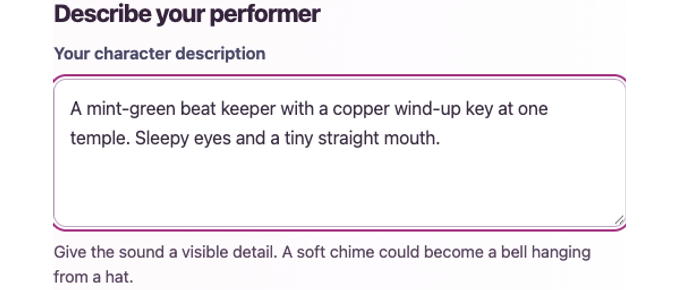
1. Describe one detail you can see
Write what makes your performer recognizable. For a clicking rhythm, name the shape and position of the wind-up key. You can edit a gallery prompt before sending it.
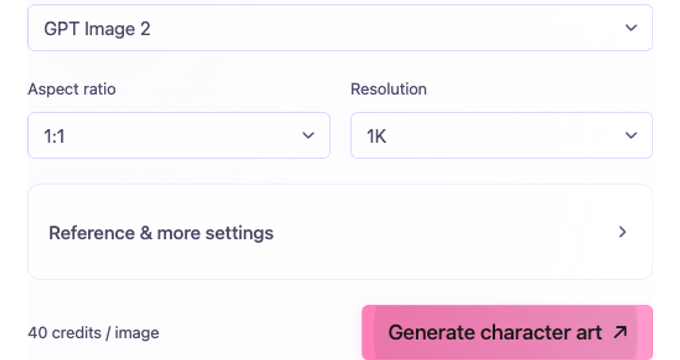
2. Frame the character and generate
Choose a square for an avatar and keep the accessory near the face. A vertical frame gives tall headpieces more room. Check the credits beside Generate character art, then submit. Open the finished image to save it.


How to draw another version of the same OC
Decide which detail makes this performer yours before you change its look.
Keep one identifying detail
Start with a gallery prompt. Keep “copper key at the left temple” and change “half-closed eyes” to “wide, startled eyes.” You can edit as much as you like before submitting.
Use a previous drawing as a reference
For a new outfit or expression, select GPT Image 2, open Reference & more settings and upload your own image. Name the detail to keep and the change you want. Check the result for small differences, such as the number of chimes.
How many credits should you set aside?
On GPT Image 2, the resolution sets the price per image. The generator shows the total beside Generate character art before you submit.
1K · 40 credits
Use 1K to try a silhouette, eye shape or headpiece. Two separate 1K attempts cost 80 credits in total.
2K · 70 credits / 4K · 110 credits
Choose a larger output when you already like the design and need more pixels. A new generation can redraw details. Recheck the displayed price if you switch models.
Using daily check-in credits
If you have a free account, sign in and open Daily check-in to see whether today’s 60-credit reward is available. At the current 1K rate, one reward covers one draft. Check your balance before starting a second.
Sprunki OC Maker questions
This tool produces a still illustration. To give a performer a voice, save the art and record or create its sound separately.
Open the finished image in the result panel. Press and hold the image on a phone or right-click on a computer, then choose the browser’s save-image option.
The saved picture is a concept asset. Adding a playable character requires a separate project with sprites, animation and audio.
Details can change between runs. Save the first version you like. If you need a variation, use that image as a reference and repeat the distinctive shape or accessory in the description.
NyankoBfLol created Sprunki. MakeMyOC provides this independent fan-art tool for drawing your own performers.
Keep designing original characters
What does your sound look like?
Pick a sound you know. A ticking clock might wear a winding key; a low hum might carry a tuning fork. Give yours a color and write its first line.